Meer controle met het nieuwe update- en uitrolmechanisme
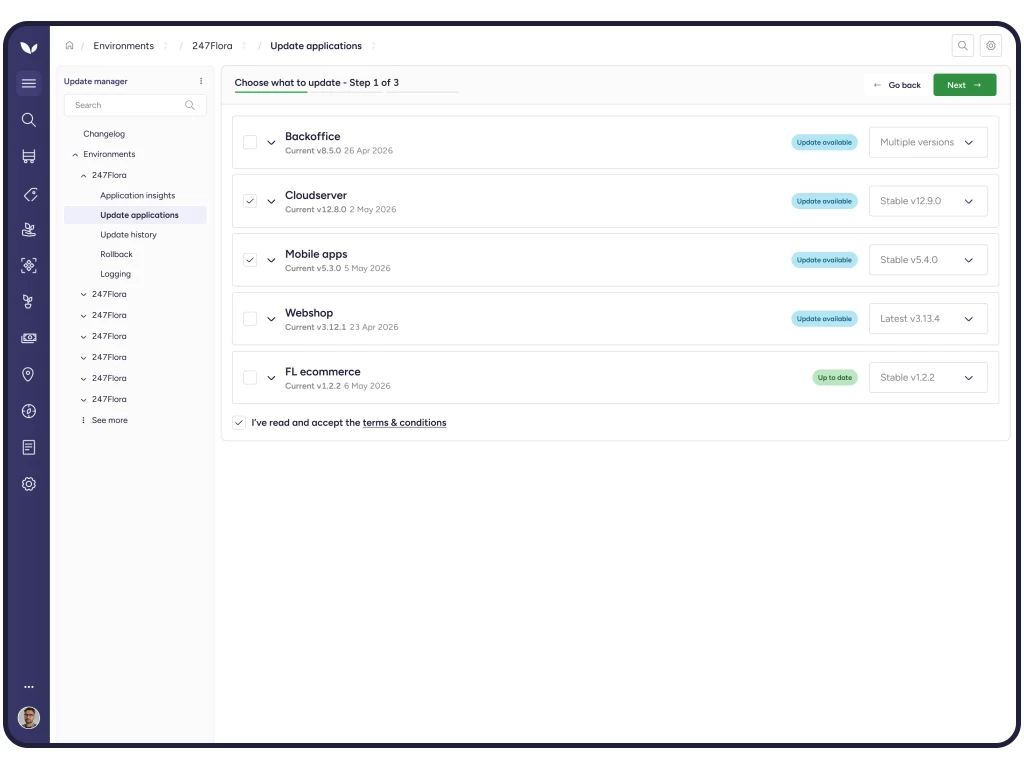
Florisoft werkt continu aan het verbeteren van haar software. Daarom introduceren we vanaf 8 september 2026 een vernieuwd update- en uitrolmechanisme waarmee u nieuwe softwareversies gecontroleerd, overzichtelijk en gebruiksvriendelijk kunt uitrollen binnen uw organisatie. Door updates stapsgewijs beschikbaar te maken voor verschillende gebruikersgroepen krijgt u meer grip op het updateproces, beperkt u risico’s en kunt u sneller inspelen op eventuele problemen.
Waarom is deze verandering belangrijk?
Voorheen werden nieuwe Florisoft-versies in één keer breder beschikbaar gemaakt voor alle gebruikers. Hierdoor was het lastiger om een nieuwe versie eerst op beperkte schaal te testen. Wanneer zich onverwacht een probleem voordeed, kon dit direct gevolgen hebben voor een grote groep gebruikers.
Daarnaast bood de oude werkwijze weinig flexibiliteit om een eerdere versie alleen voor een specifieke groep terug te zetten. Vanuit de wens om het updatesysteem gebruiksvriendelijker en toekomstbestendiger te maken, is daarom gekozen voor een nieuwe aanpak.
Gefaseerde uitrol per gebruikersgroep
Met het nieuwe update- en uitrolmechanisme bepaalt u zelf welke gebruikers toegang krijgen tot een nieuwe Florisoft-versie.
Hiervoor maakt u gebruik van drie gebruikersgroepen:
- Beheerders
- Pilotgebruikers
- Standaardgebruikers
Hierdoor kunt u een nieuwe versie eerst laten testen door beheerders of een kleine pilotgroep voordat deze beschikbaar wordt gesteld aan alle gebruikers. Eventuele bijzonderheden worden zo sneller zichtbaar, terwijl de dagelijkse werkzaamheden voor de overige medewerkers gewoon kunnen doorgaan.
Via het actieve gebruikers-scherm ziet u bovendien direct welke gebruiker met welke versie werkt. Ook kunt u eenvoudig per gebruikersgroep een eerdere versie activeren wanneer dat gewenst is.
Meer overzicht en minder risico
De vernieuwde werkwijze biedt verschillende voordelen:
- Meer controle over het beschikbaar maken van nieuwe versies
- Updates eerst veilig testen binnen een beperkte gebruikersgroep
- Sneller inspelen op eventuele problemen
- Eenvoudig een eerdere versie terugzetten voor één gebruikersgroep
- Direct inzicht in het versiegebruik via het Actieve gebruikers-scherm
- Minder risico op verstoringen voor de volledige organisatie.
Deze ontwikkeling vormt bovendien de basis voor verdere verbeteringen van het Florisoft-updatesysteem.
Wat betekent dit voor uw organisatie?
Bij de eerste overgang naar het nieuwe update- en uitrolmechanisme wordt de gebruiker die de update uitvoert automatisch als beheerder ingesteld. Alle overige gebruikers worden standaard ingedeeld bij de groep standaardgebruikers.
Vervolgens kunt u zelf bepalen welke medewerkers eventueel onderdeel worden van de pilotgroep en per gebruikersgroep instellen welke softwareversie wordt gebruikt.
Probeert u nog gebruik te maken van de oude manier van uitrollen, dan ontvangt u automatisch een melding dat deze werkwijze niet langer wordt ondersteund. U wordt daarbij verwezen naar de handleiding.
De gekozen versie wordt actief nadat Florisoft opnieuw is gestart.
Ondersteuning
Wilt u ondersteuning bij de eerste inrichting van het nieuwe update- en uitrolmechanisme? Onze Support-afdeling helpt u graag. Stuur hiervoor een e-mail naar onze Support-afdeling. Naar aanleiding van uw aanvraag neemt een van onze medewerkers contact met u op om een geschikt moment in te plannen voor de eerste update en inrichting. Zo begeleiden wij u stap voor stap, zodat u direct optimaal gebruik kunt maken van de nieuwe mogelijkheden.
Daarnaast is de handleiding 'Nieuw update- en uitrolmechanisme Florisoft' beschikbaar. Hierin wordt stap voor stap uitgelegd hoe het nieuwe update- en uitrolmechanisme werkt.
Vanaf 8 september 2026 worden gebruikers die nog via de oude werkwijze een softwareversie proberen uit te rollen automatisch naar deze handleiding verwezen.
Meer informatie?
Heeft u naar aanleiding van deze informatie nog vragen? Neem dan gerust contact op met ons kantoor via onderstaande contact button.
Wellicht ook interessant?